
Updated: December 16, 2025
Table of contents
General info
What is Twilio?
Twilio is a third-party communications company from which you can create an account in order to send SMS to your customers through the MyStudio platform.
Prerequisites before this step
In order to connect Twilio to your MyStudio account, you will need to have completed all the steps in the following articles:
- The optional first step is to purchase the Twilio add-on in MyStudio: Twilio Step 1: Buy MyStudio’s Communication Add-on.
Alternatively, you could start with this article’s steps to create your Twilio account and set everything up in that account before purchasing the add-on and connecting the Twilio account to MyStudio.
What fees are associated with connecting Twilio?
One time fees
- One time fee to Twilio associated with the A2P 10DLC registration, depending on which “brand” you fill out in the document.
- One time campaign vetting fee to Twilio per campaign.
Monthly fees
- Monthly fee to MyStudio for the communication enhancement (Twilio) add-on.
- Monthly cost to Twilio associated with the brand type you entered as well as each campaign you create, depending on your selection for the campaign use type.
- Per message usage to Twilio.
Pay as you go fees
- You will need to ensure your Twilio account has funds at all times to ensure communications don’t get interrupted. This can be set up as an auto-recharge.
Please see below for further clarification on Twilio’s pricing.
For information about pricing and fees associated with the A2P 10DLC, check out Twilio’s article here: What pricing and fees are associated with the A2P 10DLC service?
For information about SMS usage pricing and fees, check out Twilio’s article here: https://www.twilio.com/en-us/sms/pricing/us
NOTE: Twilio also has different support level tiers. While not mandatory to purchase, you can select a higher support level for an additional monthly cost. Please see here for further details: Support Plans
What is the benefit of having Twilio?
Our V2 system requires you to connect your own Twilio account in order to use SMS communication. Additionally, having your Twilio account keeps you in control of your messaging limits and allows you to send emojis and images in your texts.
What are the overall steps to set up Twilio?
The full overall steps to get Twilio connected to MyStudio are:
- Purchase the Twilio add-on in MyStudio.
- Create a Twilio account. (You are here)
- Fill out business details.
- Upgrade from a trial plan.
- Get or port a phone number.
- Regulatory compliance onboarding (brand registration and A2P 10DLC campaign creation)
- Connect Twilio to MyStudio.
Where to create a Twilio account
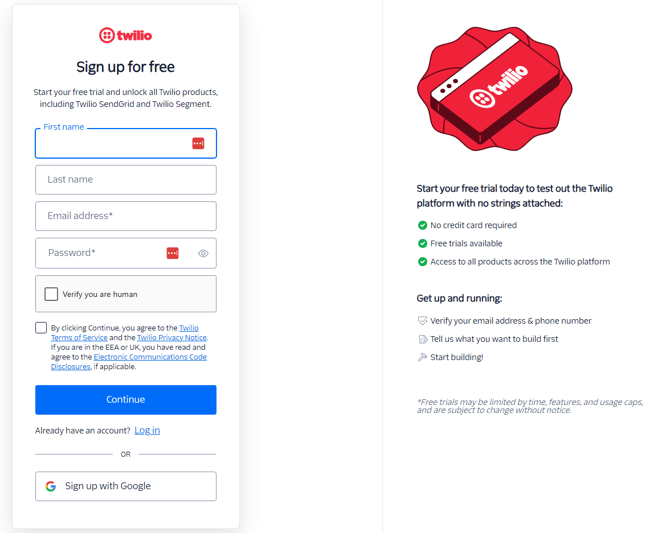
To create a Twilio account:
- Go to the Twilio sign up page
- Fill out your first name, last name, email, and a password. Or you can sign up via Google.
- Confirm you’re human and Twilio’s terms of service.
- Click continue. You may have to confirm your email is legitimate by going to your email and clicking the confirmation link from Twilio’s email.
Onboarding
Note: Twilio changes its interface on a semi-consistent basis. Even though the look and screenshots below may change, the information you need to answer for onboarding almost always stays the same.
Important: For faster brand approval later, make sure this information is fully and legally accurate.
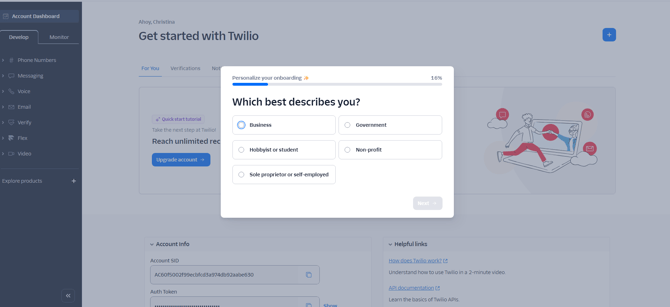
Step 1: Which best describes you?
After creating and confirming your Twilio account, you will need to go through some onboarding. You will need to answer the following:
- The vast majority will need to answer “business.”
- Only answer “sole proprietor or self-employed” if you are the only person who owns and operates your business. If you have employees, this option does not apply to you and you should select “business”.
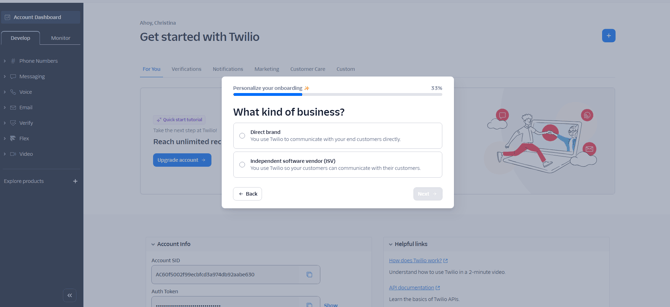
Step 2: What kind of business?
Choose “direct brand.” This is because you are the business directly communicating with your customers.
Step 3: How would you describe your role
Most will select “business owner or director” because we highly recommend the business owner to be the one to set up this account.
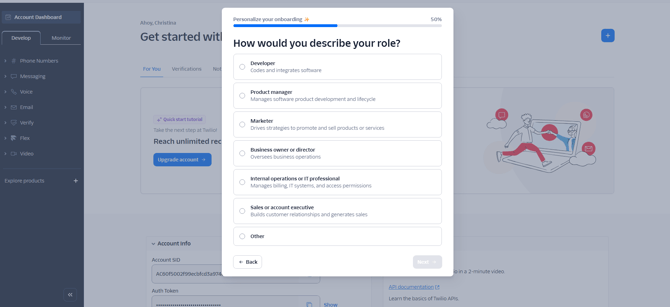
Important: Choosing any other option may result in requested information not covered in this article.
^ Back to top
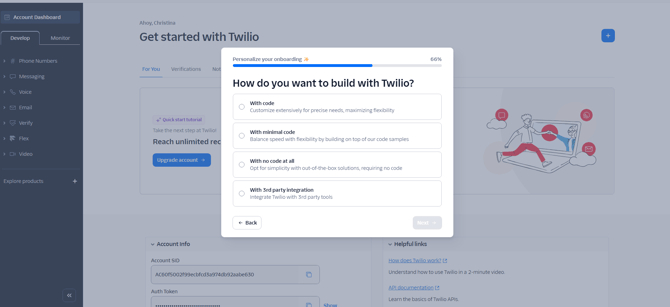
Step 4: How do you want to build with Twilio?
Choose “with no code at all.” This is because we have already created the integration into MyStudio for you, so there’s no need for you to work with coding or integration APIs.
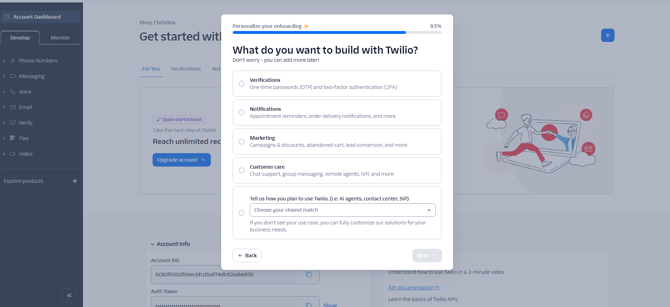
Step 5: What do you want to build with Twilio?
Choose “notifications” as it’s the closest option that covers automations, class reminders, etc.
Upgrade from a trial plan
Important: For faster brand approval later, make sure the information you provide during onboarding is precise and accurate.
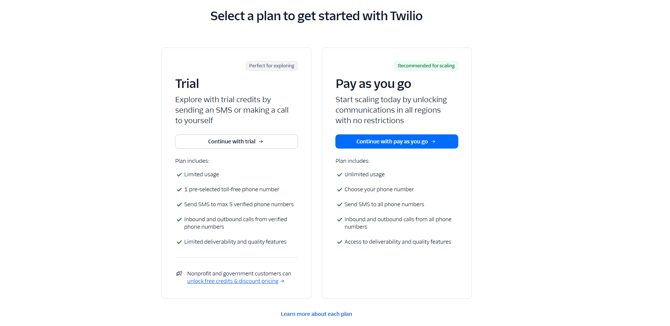
Once you have successfully onboarded with Twilio, you will start out on a trial. To upgrade from a trial:
- Click “upgrade” at the top left next to the trial amount Twilio has given you.
- If you are prompted to choose a plan, select “pay as you go”
- You will need to then fill out Twilio’s next steps.

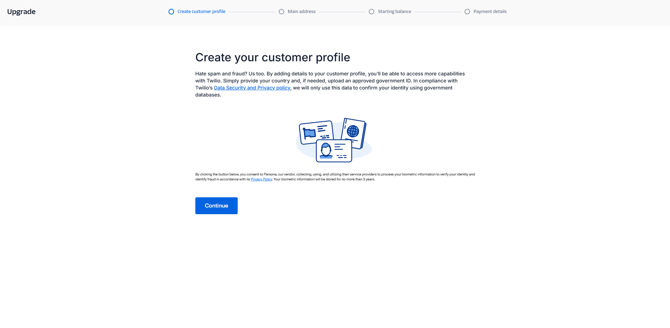
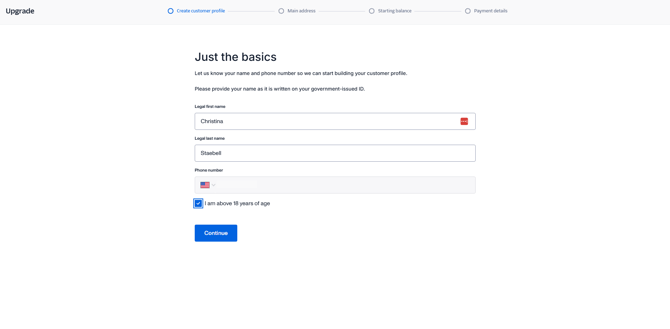
Step 1: Create customer profile
This step verifies your identity for security and law complicity purposes.
- Fill out the basics. This must match what is written on your government-issued ID:
- Legal first name
- Legal last name
- Phone number
- Check the box indicating you are over 18 years of age
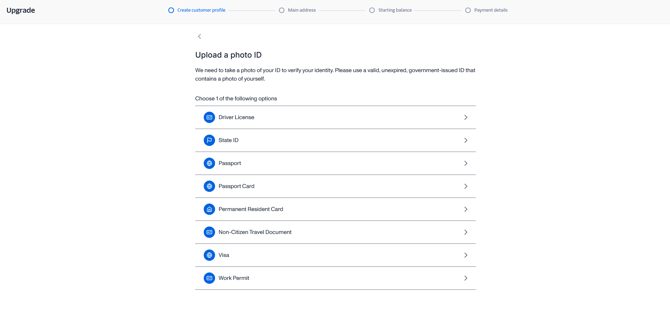
- Choose a method to verify your identity. You will be required to provide a photo of the ID and the ID must contain a photo of you.
- You might be asked about your business details. If you do not see the following info asked of you, it will come up later. This could include:
- Legal business name
- Your business’s website URL (for faster approval, use a business domain (such as “@business.com”) instead of a general email (such as “@gmail.com”).
- The industry of your business
- Business registration authority: this is the agency who provided you your business registration number. In the US this would be the IRS.
- Business registration number (sometimes referred to as a business tax number): In the US this would be your business’s EIN (Employer Identification Number)
Step 2: Main address
This step has you fill out your business address for tax purposes.
- Enter your business’s address
Step 3: Starting balance
Twilio charges your account per SMS message sent. This step fills your Twilio account balance. We recommend having at least $50 in your account at all times to avoid SMS over drafting. Without funds in your account, communications will be temporarily cut off and your SMS messages will not go through to your customers.
We also recommend selecting to auto-recharge the account for when funds get low.
Step 4: Payment details
Enter your payment details to fund the account.
Get a phone number
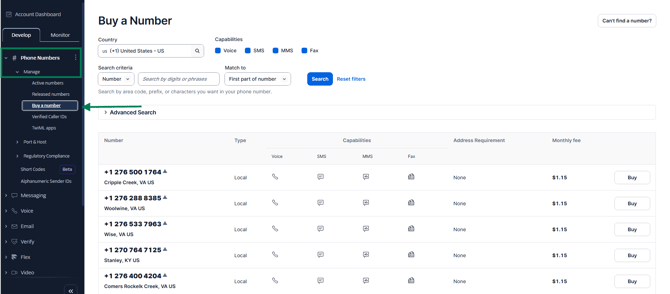
If you don’t want to use your current business phone number for SMS communication, you will need to buy a number in Twilio. To do so:
- On the left hand side, drop down the “phone numbers” category.
- Drop down the “manage” subsection.
- Choose “buy a number.”
- You can search for a number in your local area.
- Make sure it has SMS capability.
- Click “buy” next to the desired number. This will accrue a monthly fee.
Can I keep using my current MyStudio number?
If you are one of our legacy accounts and would like to continue using the MyStudio number you were using before, you will still need to create a Twilio account and upgrade to an SMS plan. We will also need to port your MyStudio number into your Twilio account.
See this article for more details: Porting your MyStudio Number into your Own Twilio Account
Next step after setting up Twilio and getting a number
The next step is to fill out the A2P 10DLC brand registration and create an SMS campaign. These are legal verifications required by the US government if you are sending SMS to the US with a 10-digit phone number.
- To complete these next steps: Twilio Step 3: Regulatory Compliance Onboarding (Brand Registration and A2P 10DLC Campaign Creation)
- If you bought a toll-free number instead, there is a different verification process: Twilio Step 3 Alternative: Toll-free Verification
Note: While MyStudio does not prevent connecting a toll-free number to our system, we do not know how receiving messages from your customers will behave with these types of numbers from Twilio’s perspective. Toll-free numbers also generally mean higher costs per text.
Frequently asked questions (FAQs)
I already have a Twilio account
If you already have a Twilio account, you will still need a new number to connect to MyStudio.
Can I buy a toll-free number?
Yes, you can buy a toll-free number, but be aware of the following:
- This will generally mean higher costs per text usage
- While you won’t have to complete the A2P 10DLC, there is a separate required verification process for toll-free numbers in order to send SMS to the US and Canada.
Important: While MyStudio does not prevent connecting a toll-free number to our system, we do not know how receiving messages from your customers will behave with these types of numbers from Twilio’s perspective.
Can I use my current business’s number for SMS?
If you have a business number that allows sending and receiving SMS, you could use this number, but it would require you to port it from your current phone carrier to Twilio and is a complicated process that may take some time. Please reach out to Twilio directly for more information on this process.