
Updated: April 20, 2026
Table of contents
Permissions and accessibility
Staff access:
-
Admin: Full access
-
Manager: Full access
-
Staff: No access
MyStudio plan restrictions:
-
Add-on purchase required, but available for all plans.
What is Business Website Pro?
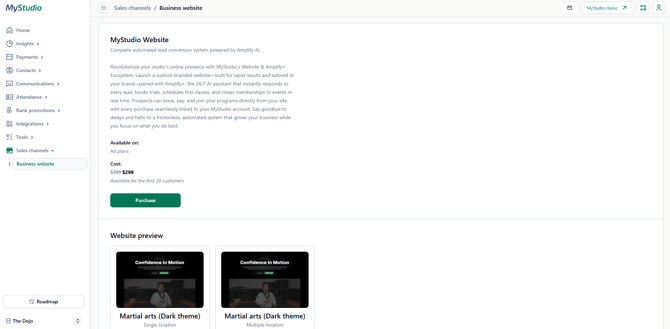
Business Website Pro is a paid add-on that gives your studio a modern, custom-built website. A dedicated MyStudio account manager builds it for you and trains you on how to make edits.
It comes bundled with Amplify Plus, an AI assistant that automatically responds to leads, books trials, and closes memberships around the clock.
What's included
-
One-on-one website build with a MyStudio account manager
-
Training on how to edit the site yourself (no coding involved)
-
Modern website design with improved SEO
-
Integrated class calendar
-
Amplify Plus AI lead engagement — bundled in
Already have Amplify? You may see an error at checkout. Contact your account manager and they'll add the website add-on to your account manually.
What you need before purchasing
Before your website can be set up, you'll need:
-
Your own website domain
-
An OpenAI account with at least $50 added to your wallet (required for Amplify+)
How to purchase
-
Log in to MyStudio V2.
-
Go to Sales channels (the store icon in the left menu).
-
Click Business website.
-
Review the plan details.
-
Click Purchase and complete the payment information.
How to preview the website before buying?
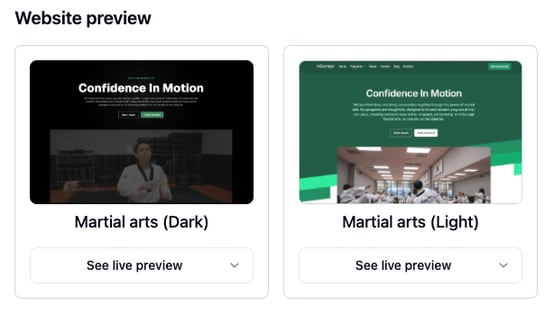
You can view live previews for both single-location and multi-location studio styles before committing.
-
Log in to MyStudio V2.
-
Go to Sales channels (the store icon).
-
Click Business website.
-
Scroll to the bottom of the page and click See live preview.
What happens after you purchase
-
Your MyStudio account manager reaches out to schedule a consultation.
-
They gather your studio information and build the site.
-
You receive a walkthrough and training on how to make edits.
-
You get an editor invite by email — click it to create your editing account.
-
Your site goes live and you can make edits anytime.
Once your site is live, see V2: How to edit your Business Website Pro for a step-by-step editing guide.
Multiple locations
If you have more than one location, contact your account manager before purchasing. The number of locations is confirmed during the consultation. Each additional location has an added cost and gets its own "Locations" section on the site.
Frequently asked questions (FAQs)
Will my existing V1 website be affected if I don't purchase Business Website Pro?
No. Your V1 website stays exactly as-is.
Is Amplify included in the price?
Yes, Amplify+ is bundled with Website Pro. If you have multiple locations and want Amplify at each one, additional locations need Amplify added separately — this will be covered during your consultation.
If I already have Amplify, do I get a discount?
Contact your account manager. They'll handle the pricing and get the add-on applied to your account.
How do I set up Amplify?
See the Amplify setup guide.
Still need help? Contact your MyStudio account manager or reach out to our support team.