
Updated: December 16, 2025
Table of contents
Permissions and accessibility
Staff access:
- Admin: Full access
- Manager: No access
- Staff: No access
MyStudio plan restrictions:
- There are no plan restrictions for purchasing the Twilio add-on.
General info
What is Twilio?
Twilio is a third-party communications company from which you can create an account in order to send SMS to your customers through the MyStudio platform.
What is the MyStudio communication add-on?
The MyStudio communication (Twilio) add-on allows users to connect their Twilio accounts in order to send SMS through the MyStudio platform. Additionally, the add-on permits emoji and image sending.
Prerequisites before this step
This is the first step for the Twilio connection process because you are able to purchase the add-on and connect Twilio later. Alternatively, you could follow the other steps in order to create your Twilio account and set everything up in that account before purchasing the add-on and connecting the Twilio account to MyStudio.
What fees are associated with connecting Twilio?
One time fees
- One time fee to Twilio associated with the A2P 10DLC registration, depending on which “brand” you fill out in the document.
- One time campaign vetting fee to Twilio per campaign.
Monthly fees
- Monthly fee to MyStudio for the communication enhancement (Twilio) add-on.
- Monthly cost to Twilio associated with the brand type you entered as well as each campaign you create, depending on your selection for the campaign use type.
- Per message usage to Twilio.
Pay as you go fees
- You will need to ensure your Twilio account has funds at all times to ensure communications don’t get interrupted. This can be set up as an auto-recharge.
Please see below for further clarification on Twilio’s pricing.
For information about pricing and fees associated with the A2P 10DLC, check out Twilio’s article here: What pricing and fees are associated with the A2P 10DLC service?
For information about SMS usage pricing and fees, check out Twilio’s article here: https://www.twilio.com/en-us/sms/pricing/us
NOTE: Twilio also has different support level tiers. While not mandatory to purchase, you can select a higher support level for an additional monthly cost. Please see here for further details: Support Plans
^ Back to top
What is the benefit of having Twilio?
Our V2 system requires you to connect your own Twilio account in order to use SMS communication. Additionally, having your Twilio account keeps you in control of your messaging limits and allows you to send emojis and images in your texts.
Can I keep using my current MyStudio number?
If you would like to continue using the MyStudio number you were using before, you will still need to create a Twilio account and upgrade to an SMS plan. We will also need to port your MyStudio number into your Twilio account.
See this article for more details: Porting your MyStudio Number into your Own Twilio Account
What are the overall steps to set up Twilio?
The full overall steps to get Twilio connected to MyStudio are:
- Purchase the Twilio add-on in MyStudio. (You are here)
- Create a Twilio account.
- Fill out business details.
- Upgrade from a trial plan.
- Get a phone number.
- Regulatory compliance onboarding (brand registration and A2P 10DLC campaign creation)
- Connect Twilio to MyStudio.
Purchasing the add-on in V1
To purchase the add-on in V1:
- Login to V1.
- Go to the settings gear at the bottom left.
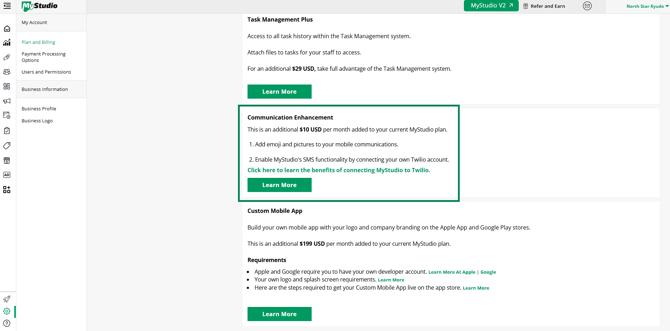
- Click “learn more” for the communication enhancement in the plan and billing section.
- Complete purchase. You can connect your Twilio account at a later time.
Purchasing the add-on in V2
- Login to V2.
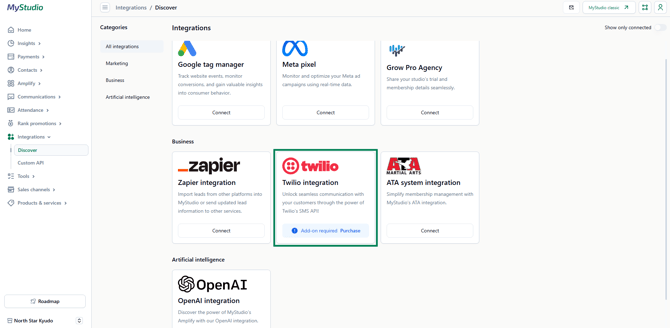
- Go to integrations > discover.
- Click on the Twilio card to learn more about it.
- Click “connect” to purchase. You can connect your Twilio account at a later time.
Next step after purchasing the Twilio add-on
The next step is to create and set up your Twilio account if you don’t already have one. This includes creating the account, upgrading your account from a trial, and getting a phone number.
- Check out the next step here: Twilio Step 2: Setup Twilio Account
Frequently asked questions (FAQs)
Can I purchase the add-on without connecting to Twilio?
Yes! Purchasing the add-on without connecting Twilio immediately will allow you to send image attachments in in-app messages.
What happens if I don’t connect to Twilio?
If you don’t get the add-on you won’t be able to send SMS to your customers through MyStudio and you won’t have access to emojis and image attachments for emails and in-app messaging. If you get the add-on, but don’t connect to Twilio, you will be able to send images through in-app messaging, but you won’t be able to send emojis or send SMS to your customers.
Do I have to get a Twilio account if I've already been using SMS in MyStudio?
Our V2 platform will require you to have your own Twilio account. Additionally, you will not be able to send emojis or images unless you connect your own Twilio account. If you are one of our legacy accounts and have a phone number that needs to be transferred to your own Twilio account, we will need to port your number.
Details for this can be found here: Porting your MyStudio Number into your Own Twilio Account
If I have multiple locations, do I have to get the add-on for each location?
Each location will need to purchase the MyStudio add-on individually and have their own Twilio number, but you are able to have one Twilio account that houses all the locations’ numbers.